

Description
Download AML Power Video Converter – video converter, convert video, convert to mp4, convert to avi, convert to mov, convert to mpeg, convert to wmv, video format conversion, free video converter, convert video files
Overview
AML Power Video Converter is a dedicated utility designed to simplify the process of converting video files across a wide range of formats. Its primary purpose is to enable users to transform media files into formats such as AVI, MPEG, WMV, MOV, and MP4, ensuring compatibility with various devices and platforms. This tool addresses the common challenge of file incompatibility, particularly when transferring videos between different systems or sharing content across devices with varying format support. The app is especially useful for individuals managing personal video libraries, educators preparing multimedia content, or professionals needing quick format adjustments for presentations or digital distribution.
Target users include both casual users and those with intermediate technical knowledge who require a reliable, no-frills solution for video conversion. The developer, AML Software, has positioned this tool as a lightweight yet functional option within the productivity category. While specific details about the company’s background are not provided, the app’s longevity—first released in 2007—suggests a stable, tested foundation. Despite its age, the software remains relevant due to its core functionality and minimal system requirements. In the broader app ecosystem, AML Power Video Converter fills a niche for users seeking a free, standalone video conversion tool without the need for complex workflows or subscription models.
Key Features & Functionality
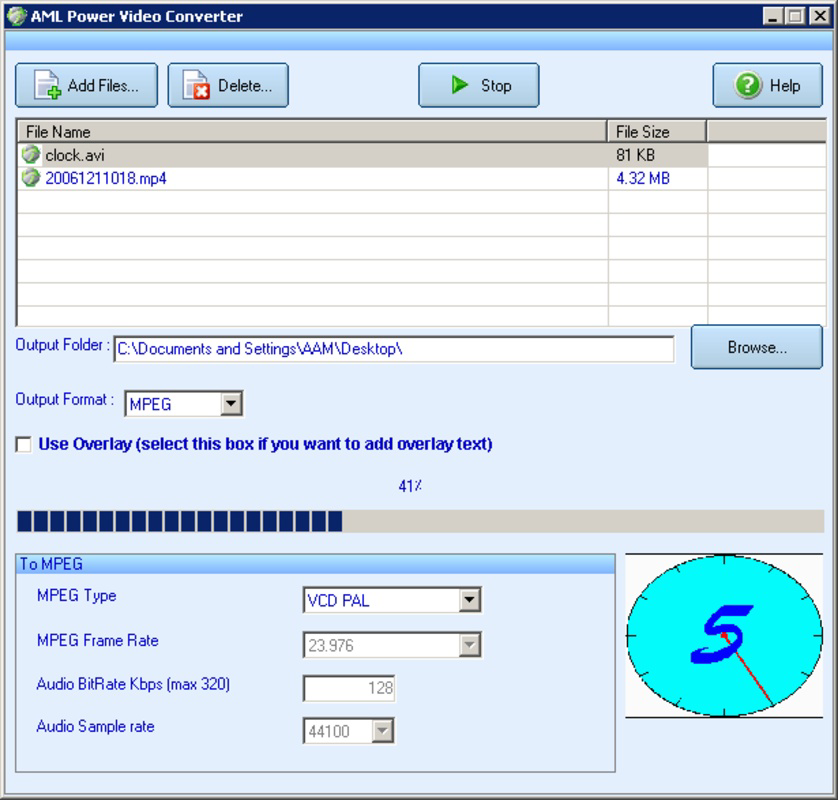
- User-Friendly Interface: The software features an intuitive layout that allows users to quickly access and manage files. Simple navigation enables even first-time users to select source videos and choose output formats without confusion.
- Wide Format Support: AML Power Video Converter supports multiple input and output formats, including AVI, MPEG, WMV, MOV, MP4, and more. This broad compatibility ensures users can convert files for use on smartphones, tablets, or legacy systems.
- Quick Conversion Speed: Optimized processing allows for rapid file conversion without compromising visual quality. This efficiency is beneficial for users handling large video files or needing immediate results.
- Customizable Output Options: Users can specify the destination folder for converted files, allowing for organized file management. This feature supports personalized workflows and reduces post-conversion file searching.
- Multi-Format Integration: Beyond video, the tool supports conversion of image files such as BMP, GIF, and JPG, enabling users to handle various media types within a single application.
For example, a student preparing a video presentation can convert a high-resolution recording into a smaller MP4 file compatible with a classroom projector. Similarly, a content creator might convert a MOV file from a digital camera into AVI for editing in older software. These real-world applications demonstrate the app’s practicality and adaptability across different use cases.
Interface, UX & Performance
The interface of AML Power Video Converter is described as straightforward and visually accessible, with clearly labeled buttons and a clean layout. Navigation is linear and predictable, minimizing the learning curve for new users. The design prioritizes functionality over aesthetics, which aligns with its utility-focused purpose. Users can drag and drop files, select output formats from a dropdown menu, and initiate conversion with minimal steps.
Although the developer did not list formal performance metrics, the software’s lightweight nature—only 1.9 MB in size—suggests low resource consumption. This makes it suitable for older or less powerful Windows systems. Responsiveness appears consistent across device categories, though specific testing across hardware configurations was not disclosed. Stability is implied by the app’s long-standing availability, though no explicit error logs or crash reports are available. The lack of advanced features like batch processing or preview functions may limit power users, but it maintains simplicity for basic conversion needs.
Platform Compatibility & Technical Requirements
AML Power Video Converter is designed for the Windows platform and is compatible with various versions of the operating system. The software version is 3.4.1, and the file size is 1.9 MB, indicating a compact and efficient installation. While the developer did not specify minimum OS requirements, the app’s age and small footprint suggest it likely runs on Windows XP and later versions. However, compatibility with modern Windows 10 or 11 systems is not confirmed in the provided data.
Users should verify system compatibility before installation, especially if using updated or non-standard configurations. The absence of cloud integration, mobile versions, or cross-platform support is notable, as the tool remains a desktop-only utility. No additional dependencies or runtime libraries were mentioned, which simplifies the setup process. For users seeking a lightweight, no-installation alternative, this may be a benefit, though it limits accessibility on non-Windows devices.
Pros and Cons
- Free to download and use with no hidden costs
- Small file size ensures quick installation and low system impact
- Supports multiple video and image formats for versatile use
- Simple interface ideal for users with limited technical experience
- Fast conversion speeds enhance workflow efficiency
- Outdated interface may appear dated compared to modern applications
- No batch conversion or advanced editing features
- Not available for mobile platforms or macOS
- Release date from 2007 suggests limited modern software integration
- No official update history or support channel provided
FAQ
Is AML Power Video Converter safe to download and install?
Yes, the app is free and available without known malware. However, users should download from official or trusted sources to ensure authenticity.
Can I convert multiple videos at once?
The provided information does not confirm batch conversion support. The app may allow one file at a time, but this feature was not explicitly stated.
Is the software compatible with Windows 10 or Windows 11?
While the app was released in 2007 and likely runs on older Windows versions, compatibility with Windows 10 or 11 is not confirmed. Users should test on their system before relying on it for critical tasks.
Does AML Power Video Converter support MP4 conversion?
Yes, the app supports MP4 as an output format, making it suitable for modern devices and online platforms.
Is there a mobile version of this app?
Currently, AML Power Video Converter is only available for Windows. There is no official mobile version for Android or iOS.
Final Thoughts
AML Power Video Converter remains a functional tool for users who need a lightweight, free solution for basic video format conversion. Its straightforward interface and broad format support make it accessible to beginners, while its minimal resource usage ensures it runs smoothly on older hardware. Although it lacks modern features like batch processing or advanced editing, its core purpose is fulfilled efficiently. For those managing a mix of video and image files and requiring quick, reliable conversions, this app offers a dependable option. While its age is evident, the software continues to serve a niche audience seeking simplicity and speed. Download AML Power Video Converter now.
Guides & Tutorials for AML Power Video Converter
How to install AML Power Video Converter
- Click the Preview / Download button above.
- Once redirected, accept the terms and click Install.
- Wait for the AML Power Video Converter download to finish on your device.
How to use AML Power Video Converter
This software is primarily used for its core features described above. Open the app after installation to explore its capabilities.
User Reviews for AML Power Video Converter 0
No reviews found


